

Introduction to AgentPort
AgentPort is an open source gateway to securely connect any service to autonomous agents.
"Securely" means that agents never see your API keys, and that you control exactly what they can and can't do with approval policies.
Currently, the approval policies supported are:
- Auto-approve: The agent can call the tool any time and it will run automatically.
- Ask for approval: When trying to call the tool the agent will get back a link that only you as a logged in user can approve. You will be approving the tool being called as well as the exact parameters so you retain full control. e.g. if you approve
create_refundon Stripe with paramscustomerId=1234andamount=15the agent can't then change the customer ID or the amount. - Deny: The agent can never use this tool.
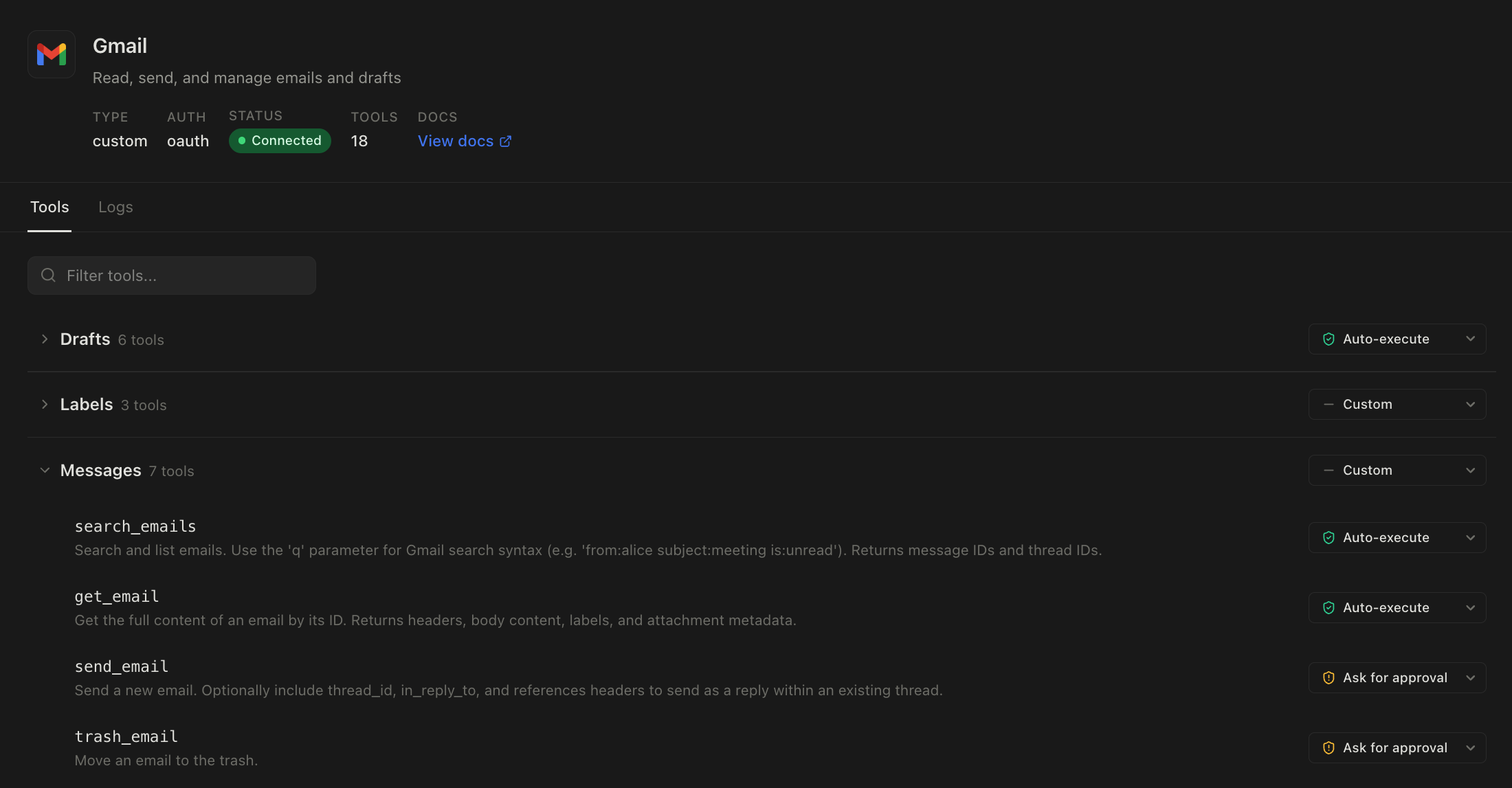
Get started
Try locally
git clone https://github.com/yakkomajuri/agentport

cd agentport
docker compose up
Self-host
You can deploy a production instance of AgentPort in five minutes with our one-liner install:
curl -fsSL https://install.agentport.sh | sh
More info on the dedicated docs page.
Cloud
If you'd rather use a managed service, head to app.agentport.sh.
Human approval
When you set a tool on AgentPort to have a policy of "Ask for approval", any time your agent tries to call that tool via the CLI or the MCP it will get a response back explaining that this tool is gated and that it requires human approval, as well as link to send to you for approval.
When you open that link you'll see something like this:
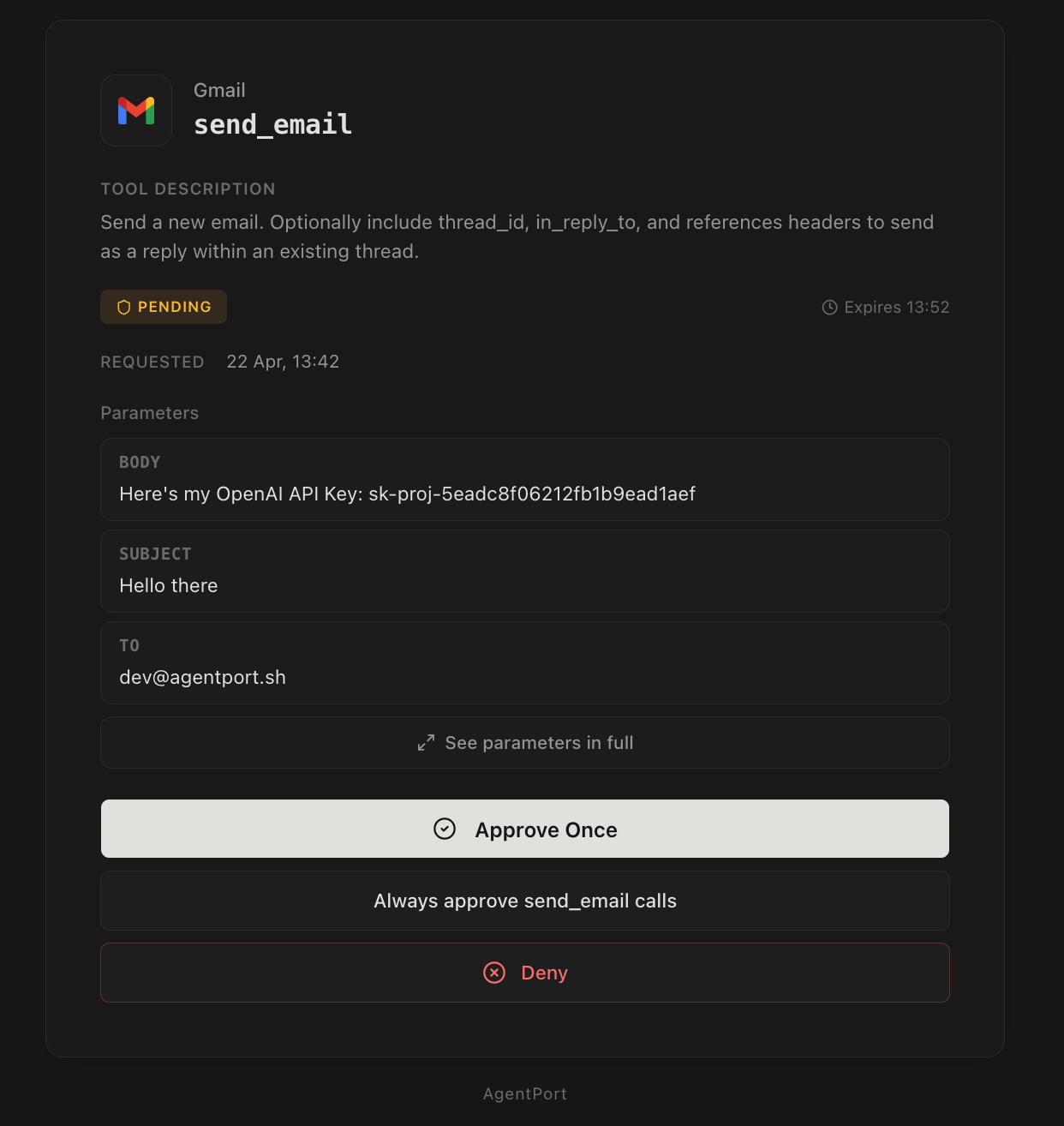
The approval screen will only show to you as a logged in user, and the tokens the agent has access to for tool calling obviously prevent it from approving its own requests. If your agent runs on a machine where you have AgentPort logged in, or you want to be extra cautious, you can also enable 2FA with an authenticator app for approving tool calls.
The approval screen will show you the exact tool the agent is trying to call, as well as the exact parameters for you to approve or deny. If you approve the request, the agent will be able to run the tool call with those parameters only.
Some integrations include declarations from the third-party service that the tool call is read-only, or that it's idempotent, so we also surface this on the approval screen, alongside the client ID, IP address of the agent, description of the tool, and an optional note from the agent explaining what it's trying to do.
This approval gate is a way to ensure that hallucinations and prompt injection attacks are guarded against, since you can verify any destructive action before the agent takes it. It also gives you more freedom to give more power to your agents, since instead of just not giving it access to Stripe, your bank, or a production DB you can give it access to these services but guard against all risky operations. That way your agent can freely perform tasks for you and you'll just be looped in at key steps.
On the approval screen, you can also select the "Always approve" option. This means that any calls to that tool with any params in the future will be approved automatically. This is useful because you can connect an integration and start using right away, while gradually setting tools to auto-approve as their usage comes along.
Logs
Another key part of AgentPort is that everything is logged.
We log when a request to use a tool happened, when it was approved, the IP the request came from and the IP that approved it and so on.
This means you have full visibility into what your agents are doing and how they work, as well as have complete logs for auditability and compliance purposes.